What You’ll Learn
- What a CLIP score is — the mechanism for quantifying similarity between text and images
- How to actually calculate it in Python — complete code examples using the transformers library
- How to read scores and caveats — higher isn’t always better, and its limitations
- Application to test articles — how to use CLIP scores for multi-condition comparisons
What Is a CLIP Score?
Overview of the CLIP Model
CLIP (Contrastive Language-Image Pre-training) is a multimodal model published by OpenAI in 2021 (paper: Learning Transferable Visual Models From Natural Language Supervision).
CLIP embeds text and images in the same vector space, trained on 400 million text-image pairs. It consists of a text encoder and an image encoder, and by computing the cosine similarity of their output vectors, you can numerically measure how much a text and an image “semantically match.”
Use Cases in Image Generation
In AI image generation, CLIP score can be used for:
- Quantifying prompt-to-generated-image alignment — “How much does this image generated from this prompt reflect the intent of the prompt?”
- Comparing multiple prompts or parameters — When changing conditions for the same subject, which is more faithful to the prompt?
- Supplementing subjective evaluation — Grasping trends numerically rather than “somehow looks good”
How to Calculate CLIP Score
Environment Setup
Install the required packages:
pip install transformers torch pillow
Calculation Script
The following script takes an image file and prompt text, outputting a CLIP score (0 to 1).
Usage is simple:
python clip_score.py image.webp "a beautiful mountain landscape with lake"
Code Highlights
openai/clip-vit-base-patch32is the most standard CLIP model, used as a baseline in many benchmarkslogits_per_imageis the cosine similarity multiplied by a temperature parameter (trained), giving a more interpretable scale than raw similarity- Using
torch.sigmoidconverts to the 0–1 range. Since raw logit values can be negative, this conversion produces an intuitive score
Actually Calculating
Here we look at what CLIP score values look like for 3 different genres of images.
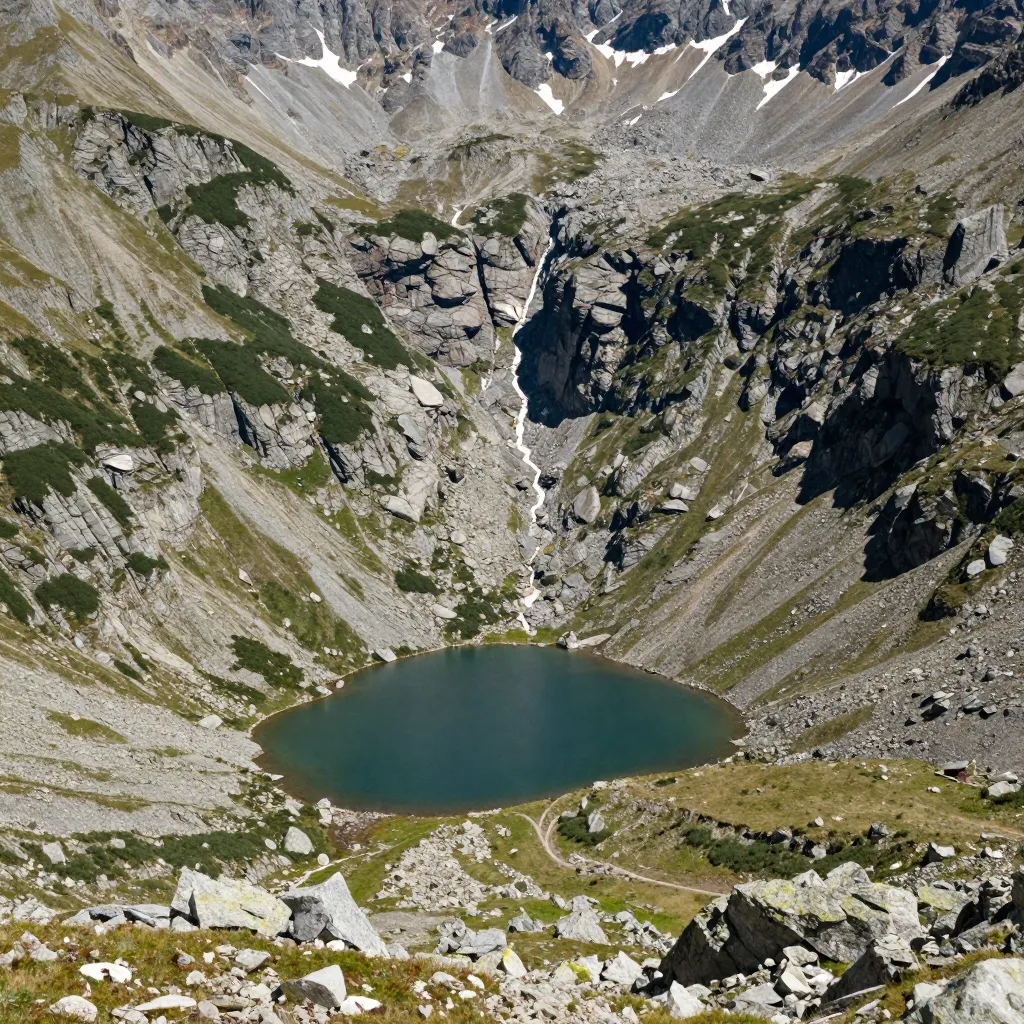
Example 1: Mountain Landscape

CLIP Score: 0.89
The image shows an aerial view of a mountainous area with rocky terrain and grass, an emerald green lake in the center, and snow near the peaks. The prompt’s “mountain,” “lake,” and “snow-capped” are reflected, but “reflected in still water” (lake surface reflection) and “golden hour lighting” (evening light) cannot be confirmed in the image. Nevertheless, the score comes out at a relatively high 0.89, suggesting that landscape photos tend to score high when key subject elements are clear.
Example 2: Cat

CLIP Score: 0.87
The image shows a tabby cat sleeping on a gray sofa. Coat color (orange tabby), pose (sleeping), location (sofa), and the soft natural light atmosphere (soft natural lighting) align well with the prompt. However, how much texture adjectives like “fluffy” are reflected in the score varies by image.
Example 3: Food

CLIP Score: 0.84
The image shows ramen in a bowl photographed from above, with 2 soft-boiled eggs and chopped green onions visible. “soft-boiled egg,” “green onions,” and “overhead shot” align well, but “steam rising” cannot be confirmed in the image. Food images tend to score slightly lower, and the score varies based on how many detail elements are reflected.
Score Tendencies
| Prompt | Score |
|---|---|
| Mountain landscape | 0.89 |
| Cat | 0.87 |
| Ramen | 0.84 |
Note: A difference of around 0.05 is hard to distinguish visually. A gap of 0.1 or more tends to match what you’d perceive by eye.
Score Interpretation and Caveats
Score Guidelines
Rough guidelines for CLIP score (after sigmoid). Not an absolute standard — varies by prompt complexity and genre.
| Score | Interpretation |
|---|---|
| 0.90+ | Nearly all major prompt elements are reflected |
| 0.80–0.89 | Generally as intended. Possible differences in details |
| 0.70–0.79 | Framework matches but some elements missing or altered |
| Below 0.70 | Large divergence from prompt |
Limitations of CLIP Score
A high CLIP score image is not necessarily a “good image.” Note the following:
1. Cannot evaluate composition or aesthetic quality
CLIP is a model that measures “semantic alignment between text and image.” Whether a composition is good or colors are beautiful is outside the evaluation scope. Even if “beautiful” is in the prompt, CLIP is not accurately scoring “beauty.”
2. Scores differ greatly between English and Japanese
CLIP training data is predominantly English text-image pairs. Inputting Japanese prompts results in significantly lower scores compared to English. Using English prompts is a prerequisite for CLIP score evaluation.
3. Score changes with text length
Short prompts (a cat) tend to get high scores, while long detailed prompts tend to score lower. The more elements there are, the higher the bar to “satisfy all of them.” Direct comparison of scores from prompts of different lengths is not appropriate.
4. Cannot detect fingers or anatomical accuracy
Artifacts like “6 fingers” or “arm bending unnaturally” are not reflected in CLIP score. CLIP looks at semantic correspondence between text and image, so physical consistency within the image is outside its evaluation scope.
Note: CLIP score alone cannot determine whether an image is good or bad. Composition, aesthetic quality, and anatomical artifacts like finger errors are all outside its evaluation scope, so it should be treated only as a reference value for semantic alignment with the prompt.
Application: Using for Multi-Condition Comparison
CLIP score shows its greatest strength in comparing groups of images generated with the same prompt but different conditions.
For example, this can be used for:
- Which of prompt A or B is more faithful — Generate images from 2 prompts with the same seed and compare CLIP scores
- Effect of adding specific words — How the score changes before and after adding a word
- Stability across multiple seeds — Looking at variance (standard deviation) of scores across 3 seeds
However, CLIP score is only a supplementary metric. Final judgment should be made by visual inspection, with CLIP score used for grasping trends.
Real Data: Calculating CLIP Scores for Test Article Images
We’ve introduced the concept and code so far, so let’s actually calculate CLIP scores for images used in this blog’s test articles. Model used: openai/clip-vit-base-patch32, scores are cosine similarity (0–1).
Images from the Lighting Test Article
Comparing prompt alignment between the control image and neon lighting image from the lighting comparison article.
![[Experiment] Comparing 6 Lighting Types — How Do Effects Change Between Beach and Indoor Bar?](/tips/lighting-type-comparison/cover.webp)
| Image | Prompt | Cosine Similarity |
|---|---|---|
| Control image (control_seed42) | ..., full body, photorealistic (match) | 0.3694 |
| Neon image (neon-lighting_seed42) | ..., full body, neon lighting, photorealistic (match) | 0.3449 |
| Neon image (neon-lighting_seed42) | ..., full body, photorealistic (mismatch) | 0.3332 |
*Common prompt part: 1girl, 32yo japanese actress, bikini, standing on sandy beach, ocean background
When the neon image was given the correct prompt including “neon lighting” (0.3449) versus without it (0.3332), a 0.0117 difference appeared. Numerically small, but in the expected direction — score is higher when elements included in the prompt are reflected in the image.
The control image score (0.3694) being higher than the neon image (0.3449) is likely because the control image more straightforwardly reflects each prompt element (beach, ocean, full body) in its composition.
Images from the Cosplay Test Article
Maid uniform and chef uniform images from the cosplay outfit comparison article.
![[Test] Comparing 3 Cosplay Outfits | Can Maid and Sailor Uniform Appear with Just One Keyword?](/tips/cosplay-outfit-comparison/cover.webp)
| Image | Prompt | Cosine Similarity |
|---|---|---|
| Maid image (a01_maid_seed1) | ..., maid outfit, ... (match) | 0.2934 |
| Chef image (a05_chef_seed1) | ..., chef uniform, ... (match) | 0.2951 |
*Common prompt part: 1girl, 32yo japanese actress, [costume], standing, looking at viewer, indoor studio, soft studio lighting, full body, photorealistic
Maid and chef scores were nearly equal (difference 0.0017). Both had the specified costumes depicted, and the CLIP score evaluated them as having similar alignment.
The lighting article images (0.33–0.37) have higher scores than the cosplay article images (0.29 range), but this is influenced by prompt length differences. The cosplay article has more tokens, raising the bar to satisfy all elements, which lowers scores. This is a good example showing that comparing absolute score values between different prompts is meaningless.
Reading the Scores
Summarizing what the real data reveals:
- Comparison with the same prompt is valid: A ~0.01 difference appeared between matching/mismatching prompts for the neon image
- Absolute value comparison between different prompts is inappropriate: Different prompt lengths and element counts shift the score baseline
- Cosine similarity absolute values are low: Values around 0.3 appear, but this is a normal range for CLIP. Values close to 1.0 don’t normally appear
Note: A 0.01 difference is small on its own, but when comparing large numbers of images generated under the same prompt with different conditions, seeing the trend as a number is useful — it provides a firmer basis than a purely visual “this one looks better.”
Summary
- CLIP score is a 0–1 metric that quantifies semantic alignment between a prompt and an image
- Easy to calculate in Python — a few dozen lines of code with the transformers library
- Not a silver bullet — Cannot evaluate composition, aesthetic quality, or anatomical accuracy. English prompts are a prerequisite
- Useful for multi-condition comparison — For comparing conditions with the same prompt, or measuring the effect of prompt changes
- Planning to use it as a supplementary subjective evaluation metric in upcoming test articles on this blog
